
Key Takeaways
- Document360 is a strong documentation platform, but another solution may fit better when your priority is customer service, collaboration, guided workflows, or enterprise knowledge delivery.
- The strongest Document360 alternatives solve different problems, so your choice should begin with how employees and customers actually use knowledge.
- AI search, governance, integrations, self service, and content workflows should be evaluated alongside traditional documentation features.
- A successful replacement should improve access to knowledge without making content harder to create, maintain, or control.
Where Document360 Fits and Where It Falls Short
Document360 is primarily built around creating, organizing, publishing, and searching structured documentation. It supports public, private, and mixed knowledge base environments, making it suitable for product documentation, help centers, internal procedures, and other structured content libraries.
Its Eddy AI capabilities have also expanded significantly. Users can ask natural language questions and receive cited answers from published knowledge, while AI features help writers create, refine, summarize, and translate content. Document360 also supports AI search through knowledge base sites, widgets, chatbots, and APIs.
That makes Document360 capable knowledge base software, especially when documentation itself is the center of the use case. The fit can become less direct when your primary need is delivering guided knowledge during customer interactions, embedding verified answers deeply into employee workflows, or supporting large service operations with complex governance requirements.
You may therefore begin comparing Document360 alternatives when your needs shift toward:
- Contact center agent guidance
- Enterprise customer service workflows
- Companywide collaboration
- Knowledge delivered inside CRM or support applications
- Advanced governance across distributed teams
- Knowledge that guides employees through decisions rather than primarily presenting documentation
The distinction is less about one platform being universally better and more about what kind of knowledge experience your organization needs.
What to Look For in a Document360 Alternative
Start by defining who uses the knowledge and what they need to accomplish with it. A technical writer maintaining product documentation has very different requirements from a support agent trying to answer a customer within seconds.
Evaluate each platform across areas such as:
- Audience: Decide whether the platform primarily serves employees, customers, support agents, or all three.
- Search and AI: Test whether users can ask natural questions and receive accurate answers rather than simply lists of articles.
- Governance: Look for ownership, reviews, approvals, version management, and permission controls.
- Integrations: Determine whether knowledge can appear inside the CRM, contact center, collaboration, and productivity systems employees already use.
- Self service: If customers need direct access, evaluate the quality of the public help experience and AI assistance.
- Analytics: Make sure you can identify failed searches, underperforming content, and knowledge gaps.
Comparing internal knowledge management systems can also help clarify whether you need a documentation platform or a broader system designed to distribute organizational knowledge throughout daily work.
The 6 Best Document360 Alternatives for Knowledge Management
The six platforms below offer different advantages depending on what you need beyond Document360's documentation focused approach.
1. KMS Lighthouse
KMS Lighthouse is especially well suited to customer service, contact centers, field service, and other environments where employees need accurate information while actively completing a task.
The platform combines AI powered retrieval with centralized knowledge management, governance, guided workflows, analytics, and integrations with enterprise service environments. This makes it particularly useful when knowledge needs to tell employees what to do next rather than simply provide an article to read.
KMS Lighthouse can therefore be a strong Document360 alternative when your priority is operational knowledge, consistent customer service, or structured guidance across large service teams.
2. Confluence
Confluence is a stronger fit when collaboration is at the center of your knowledge environment. Teams can create documentation alongside project plans, product requirements, decisions, meeting information, and other shared work.
Atlassian's Rovo capabilities extend Confluence with AI powered search, chat, content creation, and retrieval across connected systems such as Jira, Slack, Google Drive, SharePoint, and other enterprise applications.
Compared with Document360, Confluence is particularly attractive for product, engineering, IT, and cross functional teams that want documentation to live within a broader collaborative workspace.
3. Guru
Guru combines enterprise search with an internal knowledge platform designed to deliver verified answers inside the applications employees already use. It can connect information from systems such as SharePoint, Google Drive, Slack, Zendesk, Confluence, and CRM platforms while preserving existing permissions.
Key strengths include:
- AI powered enterprise search
- Cited answers grounded in company information
- Knowledge verification and quality controls
- Integrations with common workplace applications
- Knowledge delivery inside employee workflows
Guru can be a stronger Document360 alternative when your priority is internal knowledge rather than formal documentation. Instead of expecting employees to visit a separate documentation portal, Guru emphasizes bringing trusted answers into the tools where work is already happening.
4. Zendesk Knowledge
Zendesk Knowledge is built around customer service. It helps teams create, organize, and deliver support content across customer self service, human agents, and AI powered support experiences. Its current capabilities include generative AI writing tools, AI translations, internal knowledge, customer portals, lifecycle management, and AI powered service features.
Key strengths include:
- Customer facing help content
- Knowledge integrated with support workflows
- AI assisted article creation
- Self service and agent knowledge
- Integration throughout the Zendesk environment
Zendesk is particularly useful if your support organization already relies on Zendesk. It can provide a more natural customer support knowledge base experience because knowledge, tickets, agents, and customer interactions are closely connected.
Compared with Document360, Zendesk places greater emphasis on service delivery than technical documentation. That makes it practical when reducing support volume and improving agent access to answers are bigger priorities than maintaining a highly structured documentation portal.
5. eGain Knowledge Hub
eGain Knowledge Hub is designed for large customer service environments where accuracy, governance, and compliance are central requirements. It connects knowledge from multiple repositories and combines AI with expert review, content workflows, and role based delivery to provide consistent information across service channels.
Key strengths include:
- Governed AI answers
- Agent guidance and process support
- Customer self service
- Compliance workflows and audit controls
- Knowledge delivery across multiple channels
eGain can be a strong Document360 alternative for enterprises that need tightly governed service knowledge rather than primarily documentation management. It is especially relevant when employees, customers, and AI systems all need access to the same approved information.
The growing range of AI knowledge management systems also makes this distinction important. AI search and generative answers add value, but the strongest platforms combine those capabilities with ownership, governance, and reliable content.
6. Helpjuice
Helpjuice focuses on straightforward knowledge base creation for employees and customers. It supports internal documentation, customer help content, customization, analytics, integrations, multilingual content, and AI capabilities through its Swifty tools.
Key strengths include:
- Internal and external knowledge bases
- Customizable design
- AI powered search and assistance
- Analytics and search reporting
- Multilingual knowledge support
Helpjuice may appeal to teams that want a simpler alternative without adopting a broader service management or enterprise knowledge platform. It can work well when your primary requirement is a self service knowledge base that is easy to customize and manage.
Where Each Platform Has an Advantage Over Document360
Choosing among Document360 alternatives becomes easier when you connect each platform with the problem it solves best.
- Choose KMS Lighthouse when contact center agents, service teams, or field employees need governed answers and guided workflows.
- Choose Confluence when collaborative documentation and project work need to live together.
- Choose Guru when employees need verified knowledge delivered inside everyday workplace applications.
- Choose Zendesk Knowledge when customer support and self service are the main priorities.
- Choose eGain when enterprise customer service requires strong governance, compliance, and knowledge delivery across channels.
- Choose Helpjuice when you want a customizable internal or external knowledge base without the complexity of a larger enterprise platform.
The best replacement is the one that matches how knowledge is actually created, reviewed, found, and used across your organization.
Comparison Table: 6 Alternatives Across Key Features
The right platform depends on whether your priority is employee knowledge, customer self service, collaboration, service workflows, or highly governed enterprise content.
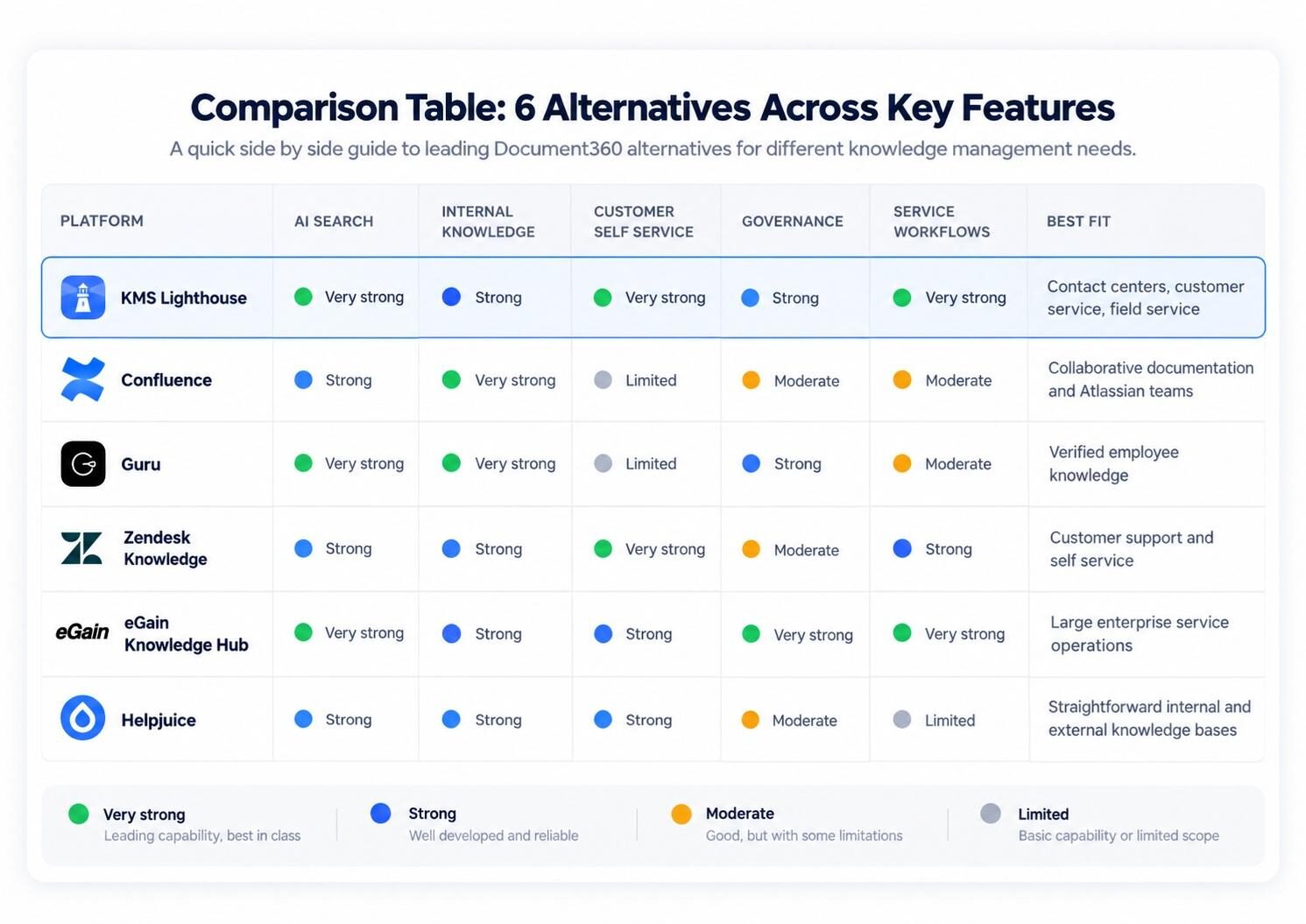
Use this table as a starting point rather than a universal ranking. Your best option depends on the type of knowledge you manage and how employees or customers need to use it.
Which Documentation Type Points to Which Alternative
Different content types naturally favor different platforms.
If you manage contact center procedures, troubleshooting scripts, compliance guidance, or step by step service processes, KMS Lighthouse is particularly well suited because it combines search with governed workflows and operational guidance.
For collaborative project documentation, product planning, technical notes, and team knowledge, Confluence offers a flexible environment where documentation can live alongside project work.
Guru is a strong fit for internal company knowledge that employees need throughout the workday. It works particularly well when answers need to appear inside collaboration and productivity applications.
For customer FAQs, troubleshooting articles, and support content, Zendesk Knowledge makes sense when your customer service operation already runs through Zendesk.
eGain is better suited to highly governed enterprise service knowledge, especially when several channels, departments, and compliance requirements are involved.
Helpjuice works well for organizations that primarily need a traditional internal or external knowledge base without a broader service platform surrounding it.
How to Validate That a Document360 Alternative Actually Fits Your Team
Product demonstrations can make almost any platform look impressive. A real trial should test how the software performs with your actual information and employees.
Start by importing a representative collection of content. Include easy articles, lengthy procedures, outdated documents, restricted information, and several topics that employees frequently struggle to find.
Then test realistic scenarios:
- Ask employees to search using the language they normally use
- Test AI answers against approved information
- Check whether permissions work correctly
- Have authors create and update content
- Test approval and review processes
- Connect the platform with important workplace applications
- Review search analytics and failed queries
- Test the customer experience if you need external self service
Pay particular attention to how quickly employees can reach a useful answer. A platform may have dozens of advanced features, but those features provide little value if everyday users struggle to find information.
You should also test administration. Ask who will own content, how reviews will be handled, how permissions will change, and what happens when an article becomes outdated.
Finally, confirm migration requirements before committing. Understand what can be exported from Document360, how metadata will transfer, whether links and images remain intact, and how permissions will be recreated.
FAQs
No. Document360 supports both public and private knowledge bases, so it can be used for customer documentation as well as internal employee knowledge. Its strongest fit is typically structured documentation, which is why teams with more specialized service, collaboration, or workflow requirements may consider alternatives.
Document360 is primarily designed around structured knowledge bases and documentation publishing. Confluence is a broader collaboration workspace where documentation sits alongside projects, planning, team discussions, and Atlassian workflows. The better choice depends on whether documentation itself or broader collaboration is your primary goal.
Yes. Document360 includes Eddy AI capabilities for conversational search, AI generated answers, writing assistance, summarization, and other content tasks. You should still test its AI using your actual knowledge because answer quality depends heavily on content organization, accuracy, and coverage.
KMS Lighthouse is particularly well suited to contact centers because it combines AI powered knowledge retrieval with guided workflows, governance, and service focused knowledge delivery. This helps agents find approved answers and follow procedures during live customer interactions rather than relying primarily on traditional documentation.
Yes, although migration complexity depends on your content volume, structure, metadata, images, links, permissions, and destination platform. Before migrating, audit your existing content and remove outdated or duplicate information so you don't reproduce old knowledge problems in the new system.
Choose the Platform Around How Your Knowledge Is Actually Used
The best Document360 alternatives serve different purposes. Your decision should be based on who needs the knowledge, where they use it, how tightly it must be governed, and whether the experience centers on documentation, customer service, collaboration, or employee guidance.
A successful replacement should make trusted information easier to create, maintain, find, and apply throughout your organization.
Contact us today to learn how KMS Lighthouse can help your team build a faster, more reliable knowledge experience for employees and customers.