

Key Takeaways
- Enterprise AI Search helps employees find answers across disconnected systems without knowing exactly where information is stored.
- The strongest platforms combine natural language understanding, semantic retrieval, permissions, integrations, and trusted enterprise knowledge.
- The best choice depends on whether your priority is customer service, broad workplace search, governed knowledge, Microsoft integration, or customizable search.
Why Enterprise Search Fails Without AI
Enterprise information rarely lives in one place. Employees may search a knowledge base, CRM, shared drive, collaboration platform, ticketing system, intranet, and email before finding the answer they need. Traditional search makes that harder when every application has its own search box and ranking logic.
Keyword based systems also depend heavily on matching the language in a query with the language used in the content. An employee might search for “restore customer access” while the correct procedure is titled “account credential recovery.” If the search engine cannot understand that those ideas are related, useful information may remain hidden.
This creates a workplace search problem rather than a simple content problem. Employees waste time opening irrelevant documents, trying different terms, or asking coworkers. Enterprise AI Search improves that experience by interpreting intent and context across repositories, helping users retrieve information based on what they mean instead of where it lives.
What Separates Enterprise AI Search From Traditional Search
Traditional search is primarily designed to find matching documents. AI powered search is designed to understand a question and identify information that answers the underlying need.
Semantic search is one of the key differences. It evaluates meaning and relationships between concepts rather than relying only on literal word matches. Employees can ask natural questions without knowing the exact terminology used when the content was created.
Modern Enterprise AI Search can also combine retrieval with generative AI. Instead of returning a page of links, it can retrieve relevant passages from approved content and create a concise answer while preserving permissions. This becomes especially important as organizations build enterprise knowledge bases for AI agents, since AI agents need current and trusted organizational information.
What to Look for in an Enterprise AI Search Tool
The best enterprise search software should improve information access without weakening security or governance. Start by identifying which repositories employees need to search and which workflows create the most friction.
Important capabilities include:
- Natural language queries
- Semantic retrieval
- Connectors for important business applications
- Permission aware search
- Generative answers grounded in enterprise content
- Links back to the underlying information
- Fast indexing when information changes
- Analytics for failed searches and knowledge gaps
- Governance controls for maintaining trustworthy content
A platform can have impressive AI features and still produce poor results if its connectors are weak or its underlying information is outdated. Search accuracy, security, content quality, and ease of adoption should be evaluated together.
The 6 Best Enterprise AI Search Tools in 2026
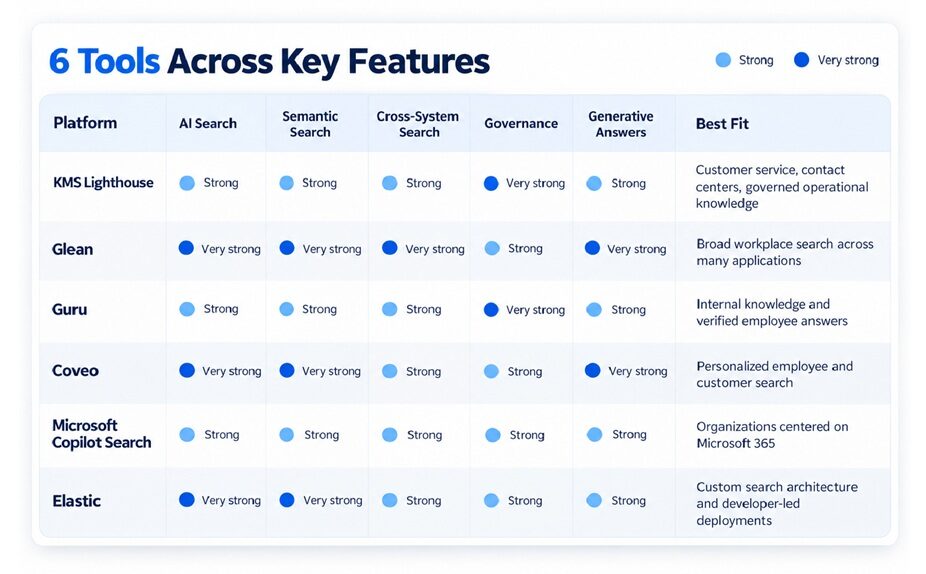
The six platforms in this guide were selected for their AI search capabilities, enterprise readiness, integrations, security, and ability to solve different information retrieval problems.
1. KMS Lighthouse
KMS Lighthouse combines AI powered search with structured enterprise knowledge management. It is especially well suited to customer service, contact center, field service, and other operational environments where employees need accurate answers and clear guidance during active workflows.
Its strength is the connection between search and governed knowledge. Employees can use natural language to reach approved information while organizations maintain content ownership, lifecycle controls, and structured procedures.
2. Glean
Glean focuses on AI powered search across workplace applications. It connects information from a large range of enterprise systems and uses organizational context to personalize results while respecting existing permissions.
Glean is a strong fit when your biggest challenge is fragmentation across a large software environment. It provides a unified search layer for information that already lives across collaboration tools, document repositories, CRM systems, and other applications.
3. Guru
Guru combines enterprise search with a knowledge management platform designed to keep internal information accurate and accessible. It connects with tools such as Google Drive, SharePoint, Slack, Zendesk, Confluence, and CRM systems, then lets employees search across that information from one experience.
Key strengths include:
- Permission aware search across connected applications
- AI generated answers with citations
- Knowledge verification and content governance
- Access within tools such as Slack and Microsoft Teams
- Knowledge Agents for targeted questions and workflows
Guru is a strong fit when you want Enterprise AI Search and an internal knowledge layer in the same platform. Its verification features are especially useful for organizations that need employees to know whether the information behind an answer is still current.
4. Coveo
Coveo uses AI to create search and discovery experiences for employees, customers, ecommerce users, and service teams. Its platform combines intelligent retrieval, relevance ranking, personalization, and generative answering.
Key strengths include:
- Personalized search results
- Generative answers grounded in indexed content
- Conversational search with follow up questions
- Permission aware retrieval
- Search experiences for service, websites, ecommerce, and workplaces
Coveo can be a good choice when search needs to serve several audiences rather than only employees. It is particularly useful for organizations that want to personalize results based on context while also providing AI generated answers from approved content.
5. Microsoft Copilot Search
Microsoft Copilot Search provides an AI powered universal search experience inside the Microsoft Copilot app. It can search across Microsoft 365 information such as files, emails, chats, and meetings, while Microsoft 365 Copilot connectors can extend discovery to systems including Salesforce, ServiceNow, Confluence, Jira, GitHub, and Google Drive.
Key strengths include:
- Deep integration with Microsoft 365
- Natural language queries
- Personalized search using Microsoft Graph signals
- Search across Microsoft and connected external systems
- Enterprise security and existing permission controls
Microsoft Copilot Search is a logical choice when your organization already relies heavily on Microsoft 365. The main advantage is ecosystem alignment. Employees can find information using systems and identity controls that are already central to their daily work.
6. Elastic
Elastic takes a more flexible and technical approach. Elasticsearch provides the search infrastructure organizations can use to build custom enterprise search, retrieval augmented generation, AI agent, and customer support experiences.
Key strengths include:
- Lexical, vector, and hybrid retrieval
- Flexible connectors and APIs
- Custom relevance tuning
- Generative AI and RAG support
- Cloud, self managed, and on premise deployment options
- Controls for roles and document level access
Elastic is a strong fit for organizations with development resources that want extensive control over how search works. It gives technical teams more freedom to design ranking, ingestion, models, and user experiences rather than adopting a more predefined employee search product.
How the Right Search Architecture Improves Results
The user interface is only one part of Enterprise AI Search. The architecture underneath it determines which information the system can reach, how quickly changes appear, and whether users see only content they are authorized to access.
Connectors determine which repositories can participate in search. Indexing determines how information is processed and refreshed. Permissions protect restricted content, while retrieval and ranking determine which passages appear when employees ask a question.
Content quality matters just as much. Duplicate documents, outdated procedures, unclear permissions, and conflicting versions can reduce the usefulness of even an advanced search platform. AI can improve discovery, but organizations still need clear ownership and reliable information behind the search experience.
This is why selecting a platform should include both technical and operational questions. You need to understand where information lives, how frequently it changes, who can access it, and whether your team wants an out of the box search experience or a platform that developers can customize extensively.
The strongest architecture is the one that fits your information environment while making trusted answers easier for employees to reach.
How to Roll Out Enterprise AI Search Without Disrupting Teams
Start with one clear business problem instead of connecting every repository at once. Customer support, IT help, policy lookup, and product documentation are good examples because employees often lose time searching across several systems.
Next, identify the repositories that contain the most valuable information for that use case. Review permissions before indexing content, then remove outdated files, duplicate procedures, and content that no longer has a clear owner.
A practical rollout should include:
- Define one or two priority use cases
- Connect the most important repositories first
- Review permissions and restricted content
- Pilot with a representative employee group
- Track failed searches and user feedback
- Improve missing or outdated content
- Expand to additional systems gradually
- Bring search into the tools employees already use
Adoption improves when search fits naturally into existing workflows. This is why knowledge management tools are more effective when search, content, governance, and service processes work together instead of operating as separate systems.
FAQs
Yes, depending on the platform and available connectors. Some products can index both cloud applications and on premise repositories, while others require additional connectors, APIs, or infrastructure. Before choosing a platform, inventory your important systems and confirm how each repository will be connected, refreshed, and secured.
Semantic search evaluates the meaning behind a query instead of relying only on matching words. An employee can ask a question using different terminology from the original document and still receive relevant results. This is especially useful when departments use different language for similar products, processes, or customer issues.
It can be, but security depends on the platform and implementation. Look for permission aware retrieval, identity controls, encryption, auditing, and clear policies for how enterprise data is processed by AI. Search results should continue respecting the access restrictions applied to the underlying information.
Indexing time varies with content volume, repository type, connector design, and update frequency. Some information can become searchable quickly, while large or complex repositories take longer. Ask vendors how initial indexing works and how rapidly new files, edits, deletions, and permission changes appear in results.
Make Enterprise Knowledge Easier to Find and Use
Enterprise AI Search can reduce the friction created by scattered information, weak keyword matching, and disconnected systems. The best platform gives employees a faster path to trustworthy answers while preserving permissions, governance, and context.
Your decision should begin with the search problem you need to solve, then work backward to the architecture, integrations, and user experience that fit your organization.
Contact us today to learn how KMS Lighthouse can help your teams find accurate enterprise knowledge faster and apply it with confidence.


